# Create Registration Pool
1\) Login to the RecConnect dashboard at: [https://admin.recconnect.io](https://my.recconnect.io)
* Ensure payments are configured. If not, follow the guide [here](https://recconnect.gitbook.io/recconnect-tutorials/payments/configure-payments).
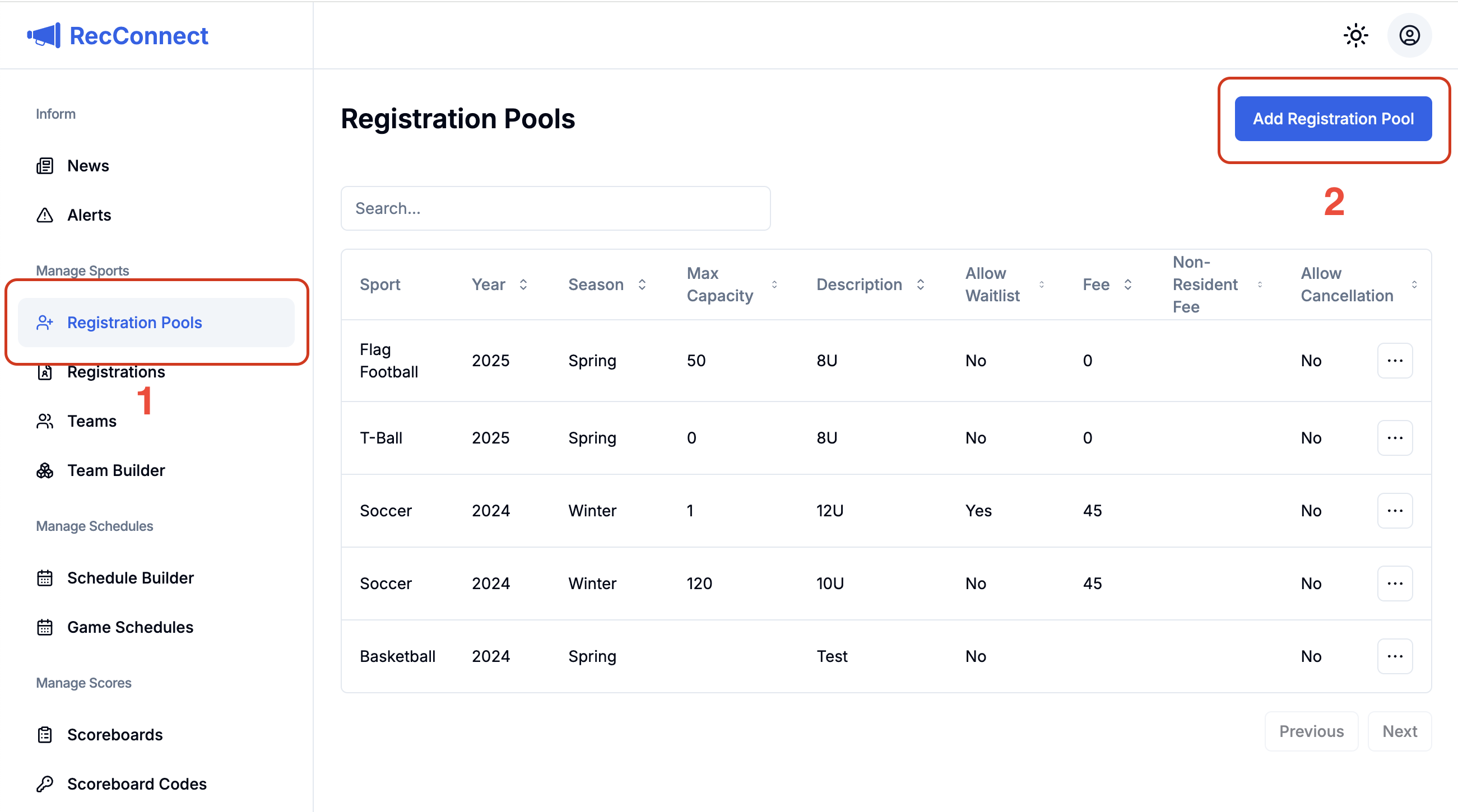
2\) Select Registration Pools in the left hand navigation
3\) Click the `Add Registration Pool` button and the `Create Registration Pool` dialog will be displayed.
Select Registration Pools and click Add Registration Pool
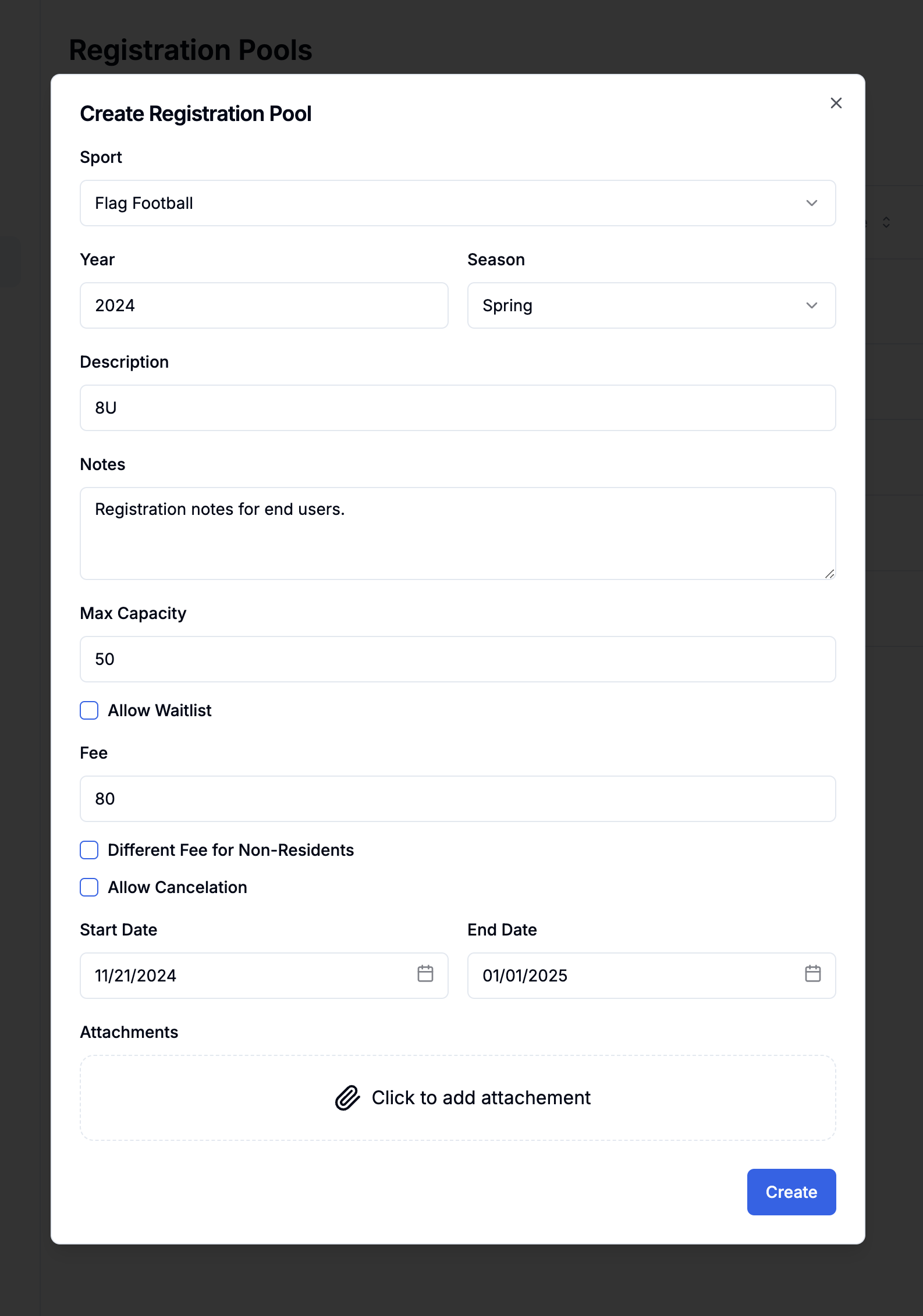
4\) Fill out the registration pool form and click `Create`. Description of each form field are [below](#form-field-descriptions).
Registration Pool Form
If the registration pool is within your state and end dates. It will automatically be available to end users in the mobile and web apps.
### Form Field Descriptions
* **Sport** - Select from the predefined list of sports or choose if this is a non sport related event.
* **Year -** The year the sport takes place
* **Season** - The season the sport takes place
* **Description** - Specify things such as age group (6U, 8U), coed, etc. There is no need to specify the sport type again in this field.
* **Notes** - Free form text field where you can provide additional information to end users. Examples could be age cut-off dates and rules.
* **Restrict Min Age** - Enforce a minimum age requirement for the registration pool (e.g. player must be 12 or older on 1/2/2025)
* **Restrict Max Age** - Enforce a maximum age requirement for the registration pool (e.g. player must be 15 years or younger on 1/2/2025)
* **Require Birth Certificate** - Select this option if you want to ensure all registrants upload a birth certificate **before** completing the registration process.
* **Max Capacity** - The max number of registrants allowed
* **Allow Waitlist** - Select this box if you would like waitlist capabilities
* **Fee** - The cost of sport or event. This is the amount you want to net. All processing and platform fees are passed onto the end user.
* **Different Fee for Non-Residents** - Select this box if you would like a different fee for non-residents
* **Allow Cancelation** - Enables parents and other end users to cancel their registrations
* **Start Date -** The day the registration pool should open and become visible to users
* **End Date** - The day the registration pool should close
* **Attachments** - Any additional documentation you would like to provide to people registering for this sport/event.
* **Agreement Forms** - Any agreement forms you would like the parents to accept before allowing them to register (e.g. injury release form, parent behavior form, etc)
---
# Agent Instructions: Querying This Documentation
If you need additional information that is not directly available in this page, you can query the documentation dynamically by asking a question.
Perform an HTTP GET request on the current page URL with the `ask` query parameter:
```
GET https://recconnect.gitbook.io/recconnect-tutorials/registrations/create-registration-pool.md?ask=
```
The question should be specific, self-contained, and written in natural language.
The response will contain a direct answer to the question and relevant excerpts and sources from the documentation.
Use this mechanism when the answer is not explicitly present in the current page, you need clarification or additional context, or you want to retrieve related documentation sections.